


Table of Contents
- How Remote Control Blinds Work: The Basic System
- What Happens When You Press a Remote Button
- How to Pair a Remote with Motorized Blinds
- Battery Life and Power Options for Motorized Blinds
- Motorized Blinds with App Control and Smart Home Integration
- Energy Efficient Motorized Shades and Automation Benefits
- Troubleshooting Common Remote Control Problems
- Safety, Accessibility, and Installation Considerations
- Frequently Asked Questions
Last Updated: October 9, 2026
How Remote Control Blinds Work: The Basic System
Remote control blinds operate through a simple chain of signals and mechanics. Pressing a button on your remote sends a wireless signal to a receiver inside the blind’s motor, which tells the motor to wind or unwind a tube that raises or lowers the blind. Three parts work together: the remote transmitter, the wireless receiver, and the motorized drive mechanism.
Understanding how these systems work helps you choose the right option for your space.
The Motor and Drive Mechanism
The motor is the heart of any motorized blind system. Housed inside the headrail (the top bar of the blind), it connects to a roller tube that holds the fabric or slats. When the motor spins, it winds or unwinds the tube, raising or lowering the blind smoothly.
Most motorized blinds use one of two drive mechanisms. A direct-drive motor connects straight to the roller tube, making the system compact and reliable. A gear-driven system transfers power through gears, providing more torque for heavier blinds or larger windows. The choice depends on your blind’s weight and window size.
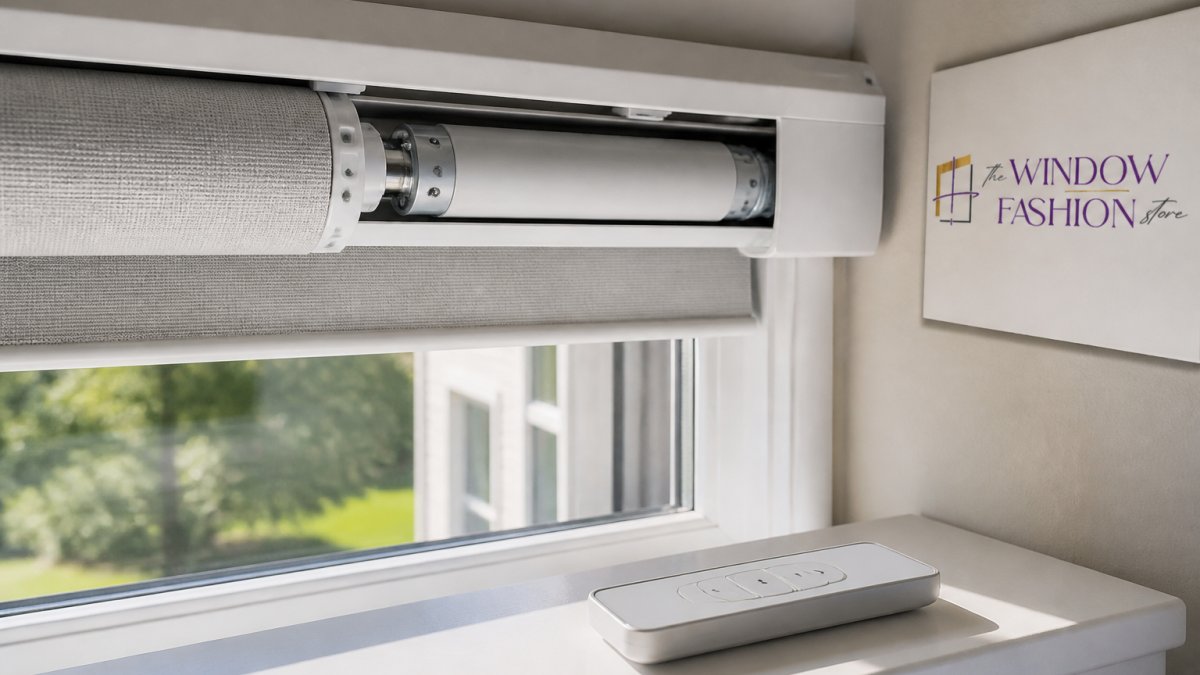
The motor draws power from either a rechargeable battery built into the headrail or a hardwired connection to your home’s electrical system. Battery-powered systems offer flexibility and easier installation; hardwired systems never need recharging and suit permanent installations.
The Receiver and Signal Communication
Every motorized blind includes a receiver, a small electronic component hidden inside the headrail that listens for signals from your remote and activates the motor.
Most modern motorized blinds use radio-frequency (RF) signals, which pass through walls and obstacles so you can control blinds from other rooms or outside your home. Some systems use infrared (IR) signals instead, requiring a direct line of sight like a traditional TV remote. RF systems offer more convenience and flexibility.
The receiver decodes the signal and understands what you want: open, close, or stop at a specific position. Some advanced receivers store multiple remote commands, letting different family members control the same blind with their own remotes.
What Happens When You Press a Remote Button
Here’s the exact sequence of events when you press your remote:
-
The button press activates the transmitter. Inside your remote, pressing the button completes an electrical circuit and activates a transmitter chip.
-
The transmitter sends a coded signal. The transmitter broadcasts a unique coded signal through the air at a specific frequency. This code identifies which blind to control and what action to perform (open, close, or stop).
-
The receiver picks up the signal. The receiver in the blind’s headrail is constantly listening for signals on that frequency. When it detects the matching code, it wakes up and processes the command.
-
The receiver triggers the motor. Based on the signal, the receiver sends power and instructions to the motor. The motor spins in the appropriate direction.
-
The motor moves the blind. As the motor spins, it winds or unwinds the roller tube. The fabric or slats move smoothly up or down until the motor receives a stop command.
-
The blind holds its position. Once you release the button or the blind reaches its limit, the motor stops. The blind stays in place because the motor has enough torque to hold it against gravity.
This entire process happens in milliseconds, which is what makes remote control blinds feel so responsive and effortless.
How to Pair a Remote with Motorized Blinds
Pairing a remote with motorized blinds means teaching the receiver to recognize that remote’s signal. Most systems come pre-paired, but adding a new remote or replacing a lost one is straightforward.
Basic pairing steps:
- Locate the pairing button on the receiver inside the headrail. This button is usually small and recessed to prevent accidental pressing.
- Press and hold the pairing button until the motor makes a small sound or the light blinks. This puts the receiver into pairing mode.
- On your remote, press and hold the up or down button. Hold it for about 3 seconds.
- Release the remote button when you hear the confirmation sound from the motor.
- Test the remote by pressing the open and close buttons to confirm the blind responds.
Manufacturers use slightly different procedures, so check your manual for exact steps. Some systems use a smartphone app instead of a physical remote; the process is the same: activate pairing mode on the receiver, then authorize the app.
If pairing fails, clear the receiver’s memory by pressing the pairing button for 10-15 seconds until you hear a reset signal, then repeat the steps. Most systems allow multiple remotes per blind, so different family members can control the same shade.
Battery Life and Power Options for Motorized Blinds
Battery life is one of the most common questions homeowners ask about motorized blinds.
Most battery-powered motorized blinds use rechargeable lithium-ion batteries built into the headrail, typically lasting 2 to 5 years depending on use. A blind operated once or twice daily lasts longer than one used multiple times per hour.
Some systems warn you when the battery runs low: a light on the remote may blink, or the blind may move more slowly. Then it’s time to recharge or replace the battery.
Recharging is simple: many motorized blinds have a charging port on the headrail for a small USB charger, and a few hours fully restores the battery. Some premium systems include solar panels in the headrail that charge during daylight.
If the battery dies completely, the blind won’t operate remotely.
Hardwired motorized blinds draw power directly from your home’s electrical system, so they never run out of battery. Installation requires running wires through your walls, but once installed they operate indefinitely without maintenance.
Motorized Blinds with App Control and Smart Home Integration
Modern motorized blinds go beyond simple remote controls. Many systems include smartphone apps that let you control your blinds from anywhere, whether opening them while you’re at work or scheduling them to open at sunrise.
App-controlled blinds connect to your home’s Wi-Fi network, and the app communicates with a hub or receiver that controls the blinds. Some systems integrate with smart home platforms like Amazon Alexa, Google Home, or Apple HomeKit, so you can use voice commands: “Alexa, close the living room blinds.”
Scheduling is a major advantage: program your blinds to open each morning and close at sunset. This creates the illusion someone is home when you’re away, improving security, and helps regulate indoor temperature by opening blinds on warm days and closing them at night.
Geofencing is another smart feature: your blinds close automatically when you leave home and open when you return, triggered by your phone’s GPS.
Integration with other smart home devices creates powerful automation, such as blinds closing when your security system is armed or opening when your smart lights detect morning.
Energy Efficient Motorized Shades and Automation Benefits
Motorized blinds and shades offer genuine energy efficiency benefits by automating when they open and close, reducing heat gain in summer and heat loss in winter.
In summer, closing motorized shades during the hottest part of the day blocks solar heat, reducing the load on your air conditioning. Proper window shading can cut cooling costs, depending on climate and shade type.
In winter, opening shades during the day lets solar heat warm your home naturally, and closing them at night prevents heat from escaping through the windows.
Motorized blinds make this automation effortless: set a schedule and forget it. Unlike manual blinds, motorized systems are consistent and reliable, operating on your schedule rather than your memory.
Motorized shades also improve home security: blinds that open and close on a schedule suggest someone is home, deterring burglars who target vacant homes. Combined with smart home integration, they can coordinate with your lighting and security system.
Troubleshooting Common Remote Control Problems
Sometimes remote control blinds don’t respond as expected. Here are the most common issues and fixes.
The remote doesn’t control the blind:
Check the remote’s batteries first, replacing them with fresh ones. If that doesn’t work, verify the blind’s receiver is powered on; some receivers have a small power switch or indicator light.
If the receiver is powered but still doesn’t respond, the remote may have lost its pairing; follow the pairing steps above.
The blind moves slowly or gets stuck:
Slow movement often indicates a low battery; recharge or replace it. If the blind is hardwired, check that the power connection is secure.
If the blind gets stuck mid-way, the motor may be overheating; let it cool for a few minutes and try again. If it keeps sticking, the motor may be failing.
The remote works inconsistently:
Inconsistent response usually means the signal is blocked or the receiver is losing power intermittently. Check for obstructions between the remote and receiver, then move closer and try again.
If the blind works sometimes but not others, the battery may be low; even a seemingly working remote can cause intermittent failures. Replace the batteries and test again.
Safety, Accessibility, and Installation Considerations
Motorized blinds offer significant safety and accessibility advantages, especially for families with children or elderly members.
Child safety: Motorized blinds eliminate dangling cords that pose a strangulation hazard to young children, a major reason many parents choose them. The remote is the only way to operate the blind and is easily stored out of reach.
Accessibility: Motorized blinds are ideal for people with limited mobility or strength.
At The Window Fashion Store, our team has over 20 years of experience installing motorized blinds and shades. We handle exact measurements, ensure proper mounting, and test every system before we leave your home.
If you’re considering motorized blinds for your home or business, the best first step is a consultation. We can visit your space, show you options from our Design Gallery, bring samples to your home, and discuss which motorized system fits your needs.
Remote control blinds transform how you interact with your windows, offering convenience, energy efficiency, enhanced safety, and seamless smart home integration. The Window Fashion Store is ready to help you explore motorized options and find the perfect solution for your space.
Frequently Asked Questions
How long do batteries in motorized blinds last?
Battery life depends on usage frequency and the type of motor. Most rechargeable batteries in motorized blinds last 3 to 5 years with regular daily use. If your blinds operate several times per day, expect batteries to deplete faster. The receiver and motor draw minimal power during standby, so most battery drain comes from actual blind movement. Check your manufacturer’s specifications for your specific model, and consider scheduling battery replacement before they fully deplete to avoid being stuck with closed or open blinds.
Can remote control blinds work without Wi-Fi?
Yes. Traditional radio-frequency (RF) remote controls operate independently of Wi-Fi and internet connectivity. The remote sends a direct signal to the receiver in your blind’s motor, so Wi-Fi outages won’t affect basic raise-and-lower operation. However, if you want smartphone app control, voice commands through Alexa or Google Home, or scheduling features, those functions require an internet connection and a smart home hub or bridge. Basic remote operation remains functional as long as batteries are charged and the receiver is within range.
How do you pair a remote with motorized blinds?
Pairing steps vary by manufacturer, but the general process involves accessing a pairing mode on both the remote and the blind’s receiver. Most systems require you to press and hold a specific button combination on the remote while the blind’s receiver is powered on, usually indicated by a blinking light. Some systems use a learning mode where you press buttons in a sequence to register channels. Consult your blind’s manual for exact instructions, as different brands use different pairing protocols. If you purchase custom motorized blinds from The Window Fashion Store, our team provides full setup guidance and can handle pairing during professional installation.
What happens to motorized blinds during a power outage?
Battery-powered motorized blinds continue operating normally during power outages because they rely on rechargeable or alkaline batteries, not household electricity. However, if your system includes a smart home hub that requires AC power, you won’t be able to use app or voice control until power is restored. The blind’s motor itself will function as long as its battery has charge. Hardwired motorized systems that plug into wall outlets will stop operating during an outage. If you’re concerned about power reliability, battery-powered options provide the most independence and peace of mind.