


Table of Contents
- Smart Home Window Shade Integration: What It Actually Means
- Types of Motorized Window Treatments and How They Connect
- Connectivity Protocols Compared: Wi-Fi, Zigbee, Z-Wave, and RF
- Power Options: Battery, Hardwired, and Solar Charging
- Energy Efficient Shades for Homes: Do Smart Shades Pay Off?
- Motorized Window Shade Installation: Retrofit vs. Custom
- Smart Shade Scheduling and Scene Control: How to Set It Up
- Common Mistakes to Avoid and Troubleshooting Tips
- Frequently Asked Questions
Last Updated: September 9, 2026
Smart Home Window Shade Integration: What It Actually Means
Smart home window shade integration is the process of connecting motorized window coverings to your home automation ecosystem so they respond to voice commands, mobile app control, and automated scheduling. Rather than treating shades as standalone gadgets, true integration makes them work alongside your lighting, thermostat, and security systems. At The Window Fashion Store, we’ve spent over 20 years helping homeowners in the Kansas City area move from manual cords to fully automated window coverings, and the most common question we hear is where to begin.
The appeal goes beyond convenience. Integrated shades can adjust themselves as the sun moves across your home, protecting furniture from fading while reducing heat gain on summer afternoons. They can close automatically at dusk for privacy, then open gently in the morning as your alarm sounds. The technology has matured to the point where setup no longer requires a degree in computer science, but choosing the right combination of shade type, connectivity protocol, and power source still demands careful planning.
Below, we’ll walk through the technical decisions that matter most, the installation paths available to you, and the mistakes that trip up even experienced smart home owners.
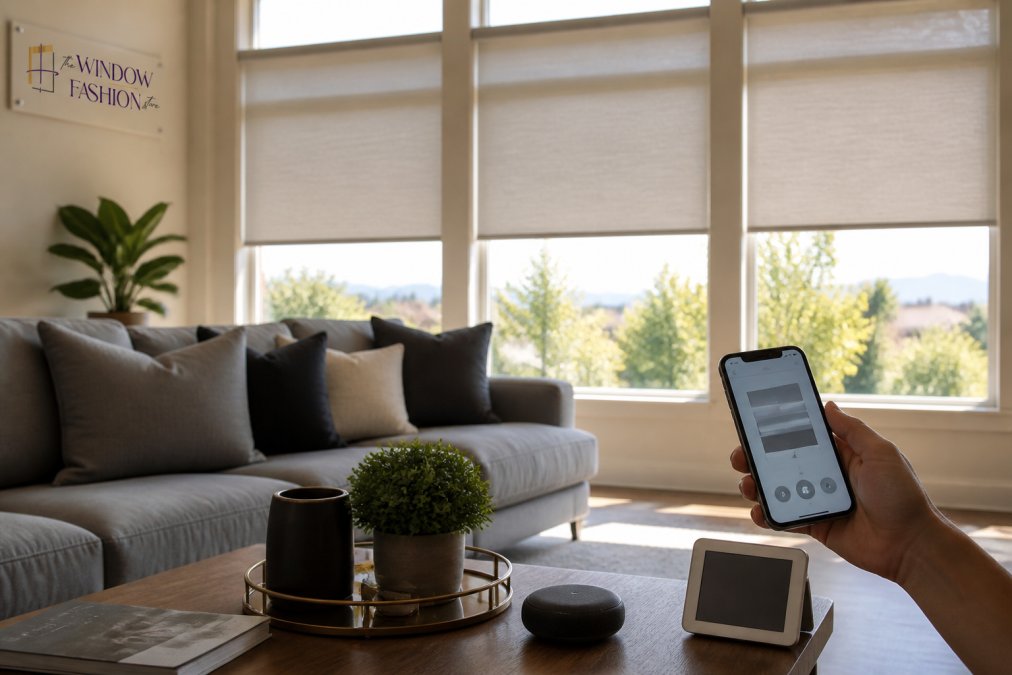
Types of Motorized Window Treatments and How They Connect
Nearly every style of window covering can be motorized today, but the way each connects to your smart home system varies significantly. Understanding the differences early prevents costly missteps later.
Roller Shades, Cellular Shades, and Roman Shades
Roller shades are the most straightforward option for automation. A single fabric panel rolls neatly around a tube, and the motor sits inside that tube, making retrofit installation simpler than with other styles. They pair well with blackout capabilities and light filtering fabrics, which makes them a favorite for bedrooms and media rooms.
Cellular shades, also called honeycomb shades, feature an accordion-like construction that traps air in pockets. That structure delivers superior energy efficiency for homes, which is why they dominate the market for rooms with large windows or extreme temperature swings. Their motorization requires a slightly different drive mechanism, but the energy savings often justify the added complexity.
Roman shades present the most challenging motorization path because their soft fabric folds require a motor that can manage the stacked material evenly. When done well, the result looks indistinguishable from a manual roman shade, but installation demands precision that generic retrofit kits rarely deliver.
Connectivity Protocols Compared: Wi-Fi, Zigbee, Z-Wave, and RF
The protocol your shades use determines how reliably they respond, how well they integrate with your existing smart hub, and whether they’ll still work when your internet drops. Choosing the right one is the single most important technical decision in the entire process.
Wi-Fi connects shades directly to your router with no additional hardware. Setup is simple, and control from your phone works anywhere with internet access. The tradeoff is that every shade consumes a slice of your network bandwidth, and a crowded Wi-Fi environment can introduce latency in command response.
Zigbee and Z-Wave are mesh network protocols designed specifically for home automation. Each shade acts as a repeater, passing signals to neighboring devices, which builds a strong network that extends throughout your home. Both require a smart home bridge or hub to translate commands, but they offer lower latency and continued local control even during internet outages. The Connectivity Standards Alliance documentation on smart home protocols provides a useful technical primer on how these mesh standards differ.
RF, or radio frequency, operates at 433 MHz and is the oldest approach still in common use. It requires no hub and works reliably through walls, but it offers one-way communication only: the shade cannot confirm it received a command. For basic remote control, RF works fine. For integration with scenes, geofencing, or voice assistants, you’ll need a bridge that translates between RF and your smart home platform.
| Protocol | Hub Required | Local Control | Best For |
|---|---|---|---|
| Wi-Fi | No | Limited | Simple setups, direct app control |
| Zigbee | Yes | Yes | Whole-home automation, low latency |
| Z-Wave | Yes | Yes | Dense mesh networks, strong walls |
| RF 433 MHz | Optional | Yes | Basic remote control, budget options |
Power Options: Battery, Hardwired, and Solar Charging
Every motorized shade needs electricity, and how you supply it affects installation cost, maintenance frequency, and long-term reliability. This decision deserves as much attention as the shade fabric itself.
Battery-powered motors offer the easiest installation since they require no wiring at all. Modern motors use rechargeable lithium-ion batteries that typically last a year or more between charges, depending on usage frequency. The catch is that you’ll need to lower each shade to access the battery compartment, which can be awkward for tall windows. Some manufacturers now offer top-mounted battery packs that eliminate this hassle.
Hardwired installation delivers the most seamless experience. Shades connect directly to your home’s electrical system, often with low-voltage wiring run through the window frame. This eliminates battery maintenance entirely and supports features like continuous power for smart home integration. The tradeoff is cost and complexity: hardwiring requires professional installation and is best planned during new construction or major renovations.
Solar charging bridges the gap between battery convenience and hardwired reliability. A small solar panel sits on the window glass and trickle-charges the shade’s battery throughout the day. For south-facing windows with good sun exposure, this approach can make battery changes nearly obsolete. The U.S. Department of Energy guidance on window coverings and energy efficiency notes that automated shading can meaningfully reduce cooling loads, which makes solar-powered shades an attractive option for sun-drenched rooms.
Energy Efficient Shades for Homes: Do Smart Shades Pay Off?
The short answer is that energy efficient shades for homes deliver measurable savings when paired with automation, but the payback depends heavily on your climate and window orientation. The real value comes from the word “smart”: a shade that adjusts itself based on the sun’s position outperforms a static shade that you raise and lower manually.
During summer, automated shades can close on east-facing windows in the morning and west-facing windows in the afternoon, blocking solar heat gain before your air conditioner works harder to compensate. In winter, they can open on south-facing windows to capture passive solar warmth, then close at dusk to add an insulating layer. This dynamic behavior is what separates integrated shades from their manual counterparts.
The insulation value of cellular shades is well documented, and the ENERGY STAR guidance on window attachments highlights how proper window coverings reduce heat loss and gain. When you combine honeycomb construction with automated scheduling, you create a window treatment that actively manages your home’s energy profile throughout the day. Many homeowners find the comfort improvements, reduced glare, and fabric protection justify the investment even before they calculate energy savings.
Motorized Window Shade Installation: Retrofit vs. Custom
Motorized window shade installation follows two distinct paths, and choosing the wrong one leads to frustration, wasted money, or both.
Retrofit devices attach to your existing shades or replace the roller tube with a motorized version. Products like smart shade motors that clamp onto manual roller shades fall into this category. They’re appealing because they cost less upfront and install in minutes. The limitations become apparent quickly: retrofit motors often protrude beyond the shade, require exposed wiring or bulky battery packs, and rarely achieve the clean, integrated look of a purpose-built motorized shade. They also tend to be louder and less reliable over time.
Custom installation means purchasing shades designed for motorization from the start. The motor sits concealed inside the roller tube, power options integrate cleanly into your window frame, and the fabric is measured precisely to eliminate light gaps. This approach costs more, but it delivers the quiet operation, seamless appearance, and long-term reliability that most homeowners actually want.
For odd-sized windows, the custom path is particularly important. A retrofit motor assumes standard dimensions, while a custom shade is fabricated to your exact measurements. Our team at The Window Fashion Store handles projects ranging from single master bedroom windows to commercial spaces with dozens of openings, and the one pattern we see consistently is this: homeowners who start with retrofit devices usually upgrade to custom within two years. To see the difference firsthand, visit our design gallery where full-sized displays of every Hunter Douglas, Alta, Norman, and Texton product we sell let you operate the mechanisms and compare fabrics before making a decision.
Retrofit motors on non-standard window sizes frequently bind or operate unevenly because the drive mechanism wasn’t designed for that shade’s dimensions. Measure your window’s exact width and height before committing to a retrofit approach, and understand that light gaps at the edges are common when the shade doesn’t match the frame precisely.
Smart Shade Scheduling and Scene Control: How to Set It Up
Smart shade scheduling and scene control is where the magic of integration becomes tangible. Instead of tapping a button every time you want privacy or darkness, you define rules that your shades follow automatically.
Start by identifying your daily routines. When does your family wake up? When does the afternoon sun hit your living room windows? When do you typically want privacy in the evening? These patterns become the foundation of your schedules.
Most smart home platforms let you create scenes that group multiple shades with other devices. A “Good Morning” scene might open your bedroom shades gradually while raising the thermostat and turning on hallway lights. An “Away” scene could close all shades and lower them to create the appearance of occupancy while you’re on vacation. Geofencing takes this further by triggering scenes based on your phone’s location: shades close when you leave and reopen when you return.
The Matter protocol is rapidly changing this landscape. Matter is an industry-standard connectivity framework designed to ensure smart home devices work together regardless of brand, and adoption is growing across major platforms. The Matter smart home standard overview explains how this standard simplifies integration by creating a common language for devices. When shopping for motorized shades, asking whether they support Matter is a smart way to future-proof your investment.
Common Mistakes to Avoid and Troubleshooting Tips
Even well-planned installations hit snags. Here are the issues we see most often, along with practical fixes.
Mistake: Ignoring hub compatibility. Many homeowners buy shades without checking whether they work with their existing smart hub. Verify protocol compatibility before purchasing, and confirm whether the shade requires a proprietary bridge or speaks your platform’s native language.
Mistake: Underestimating Wi-Fi congestion. If you have 30 shades all on Wi-Fi, your network will feel the strain. For homes with more than a handful of shades, a Zigbee or Z-Wave mesh network is almost always the better choice.
Mistake: Skipping the light gap test. Custom shades should be measured to eliminate gaps, but retrofit installations frequently leave visible light bleeding at the edges. Test your shades at various times of day before committing to a final installation approach.
Troubleshooting: Shades won’t respond to voice commands. Start by confirming the shade is powered and connected to your network. Then check whether your smart hub sees the shade as online. If both look fine, reboot the hub and try again. Persistent issues usually trace back to firmware updates, which is why choosing a manufacturer that provides regular updates matters.
Troubleshooting: Intermittent connectivity. If shades respond sometimes but not others, the problem is often signal interference or weak mesh coverage. Adding a smart home bridge closer to the shades, or repositioning battery-powered repeaters, typically resolves the issue.
Before you invest in a full home automation setup, buy a single motorized shade and test it with your existing smart hub for two weeks. This trial period reveals compatibility issues, latency problems, and ease-of-use concerns before you commit to outfitting every window in your home.
The decision to automate your window coverings is really a decision about how you want your home to feel and function. Done right, it delivers convenience, energy savings, and a level of polish that manual shades simply can’t match. Done hastily, it creates frustration and wasted expense.
That’s why the consultation matters. At The Window Fashion Store, our design gallery lets you see and operate motorized shades from Hunter Douglas, Alta, Norman, and Texton in person, and our team provides exact measurements and professional installation across the Kansas City area. We exclusively install and service products purchased through our store, which means the shades we sell are the shades we stand behind. If you’re exploring options for motorized blinds and shades, our team can walk you through how PowerView motorization works with your existing smart home setup.
Getting window automation right comes down to matching the right shade, protocol, and power source to your specific windows and routines. It’s a decision that rewards careful planning and penalizes shortcuts. Our family-owned team has guided Kansas City homeowners through this process for over two decades, and we’re ready to help you do the same. Schedule your free consultation with The Window Fashion Store to explore your options in person and get a system designed around how your home actually lives.
Frequently Asked Questions
Are motorized shades compatible with Alexa and Google Home?
Yes, most modern motorized shades from brands like Hunter Douglas and Alta work with Alexa and Google Home. The shades connect through a smart home bridge or hub, which then links to your voice assistant. Once paired, you can use voice commands like ‘lower the living room shades’ or include them in routines. Verify the specific protocol your shade motor uses, since compatibility varies between Wi-Fi, Zigbee, and Z-Wave models.
Can I retrofit my existing blinds for smart home integration?
Yes, retrofit devices exist for many standard blinds. These include battery-powered motors that attach to your existing wand or cord, and solar-powered kits for continuous operation. Retrofit works best with lighter blinds that have a consistent lift mechanism. Heavy wooden or custom shades may strain the retrofit motor. If your blinds are custom-sized or part of a premium system, a professional assessment helps confirm whether retrofitting is reliable or if new motorized shades are a better investment.
What is the difference between a smart home bridge and direct Wi-Fi connection for smart shades?
A smart home bridge acts as a central hub that translates the shade’s RF or proprietary signal into a language your home network understands. This approach is stable, supports group control, and reduces Wi-Fi congestion. Direct Wi-Fi connection means each shade connects to your router independently. It simplifies setup but can strain your network if you have many shades. For whole-home systems with 10 or more shades, a bridge generally delivers more reliable performance and faster response times.
Do smart shades really help with energy efficiency in the home?
Yes, smart shades help reduce energy use by automating based on the sun’s position. Closing cellular shades during summer afternoons blocks solar heat gain, reducing air conditioning load. In winter, opening south-facing shades during the day captures passive solar warmth. Automated scheduling ensures shades respond without you needing to remember. While shades alone do not replace insulation, they complement your HVAC system and can make a measurable difference in rooms with large windows.
How do I choose between battery-powered and hardwired motorized shades?
Battery-powered shades offer simple installation because they require no wiring, making them ideal for retrofits and rental properties. Modern battery motors last 2 to 3 years with daily use and show low-battery warnings. Hardwired shades require professional installation but eliminate battery replacement and are the right choice for new construction or large commercial projects. If your home is being built or renovated with accessible ceiling space, hardwiring offers the most seamless and maintenance-free experience.
What is the Matter protocol and why does it matter for smart window shade integration?
Matter is a new connectivity standard designed to make smart home devices work across Amazon Alexa, Apple HomeKit, Google Home, and Samsung SmartThings without separate bridges. For window shades, Matter support means a single device can communicate with all major ecosystems. Adoption is still rolling out, so verify that the shade model you choose is Matter-certified if cross-platform compatibility is your goal. Older models may rely on brand-specific apps and bridges, which work well but limit your choice of voice assistant.